
Reviews
This puzzle game offers a calm and engaging experience with six high-quality images of the Acura Type S Concept car. The four difficulty levels make it accessible for beginners and challenging for experts. The intuitive drag-and-drop interface and preview feature help players of all skill levels enjoy the game without frustration.
About this game
Game Introduction
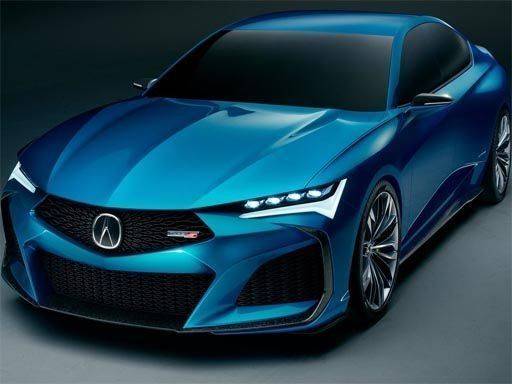
This jigsaw puzzle game presents six high-quality images of the Acura Type S Concept car. Each picture showcases the sleek design and sporty elegance of this concept vehicle from different angles. The game is family-friendly and suitable for all ages, offering a relaxing yet stimulating activity for puzzle enthusiasts. The core objective is to assemble each image by correctly placing all puzzle pieces. What makes this game unique is its focus on a single, beautifully designed car model, allowing players to appreciate its details from multiple perspectives. The game provides a calm and engaging experience that can help improve concentration and visual perception.
How to Play
To play, select one of the six available images of the Acura Type S Concept. Then choose your preferred puzzle mode: 16 pieces for a quick challenge, 36 pieces for a moderate test, 64 pieces for a tougher puzzle, or 100 pieces for a real brain workout. Drag and drop the jigsaw pieces into the correct positions to complete the picture. The game provides a smooth and intuitive interface, making it easy for players of all skill levels to enjoy. You can preview the completed image for guidance.
Game Features
Game features include six stunning Acura Type S Concept images. There are four puzzle modes per image. The adjustable difficulty allows players to choose their preferred challenge. The gameplay is designed to boost cognitive skills like problem-solving and spatial reasoning. The interface is simple and user-friendly, suitable for both beginners and experienced puzzle solvers. The game is available online and requires no download.
Tips for Success
Start with the 16-piece mode to get familiar with the interface and image details. Focus on assembling the edges first, as they provide a clear frame. Use the preview image as a reference to identify where specific pieces belong. Practice regularly to improve your speed and accuracy. Gradually increase the piece count for a greater challenge.
Compatibility
This H5 game runs smoothly on:
• Desktop computers (Windows / Mac) • Mobile phones (iPhone / Android)
• Tablets (iPad / Android)
🌐 Best experienced with Chrome, Safari, or Edge
Faq
Can I play this puzzle game on my mobile device?
The game is designed to be accessible on various devices, including smartphones and tablets, as it runs in a web browser. No download is needed, so you can enjoy it on the go as long as you have an internet connection.
Are there any time limits or scoring in the game?
The game does not impose time limits, allowing you to solve puzzles at your own pace. There is no scoring system, making it a purely relaxing experience focused on completing each image.
How many total puzzles are available in the game?
There are six different images of the Acura Type S Concept car. Each image can be played in four piece counts, giving you a total of 24 possible puzzle combinations to enjoy.
Is the game suitable for children?
Yes, the game is family-friendly and suitable for all ages. The 16-piece mode is ideal for younger players, while older children and adults can try the more challenging piece counts.
Do I need to create an account to play?
No account creation is required. The game is available to play directly in your browser without any registration or login process.
Can I save my progress and return later?
The game may not automatically save your progress, so it is best to complete a puzzle in one session. However, you can easily restart any puzzle from the beginning if needed.









Comments
0 comments