
Reviews
This matching activity stands out for its patient design. Early rounds let children build confidence with simple forms, while later stages introduce complexity at a comfortable pace. The visual style is clean and inviting, with soft colors that keep focus on the task. Feedback is always positive, turning mistakes into learning moments. Cross-platform support means it works on almost any device. It is a reliable choice for parents seeking screen time that actually develops cognitive skills without pressure or distraction.
About this game
Core Matching Principle
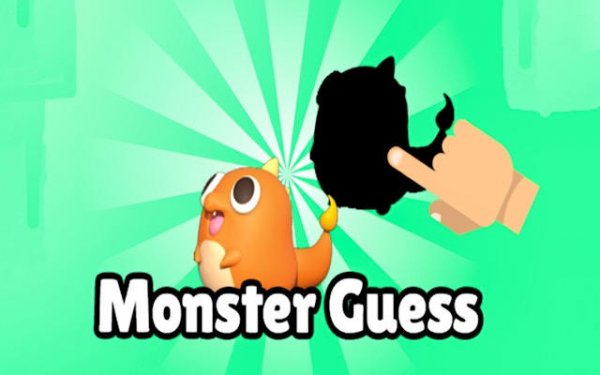
Each round presents a bright, solid form on one side of the screen. The player must locate the corresponding dark outline among several options. This straightforward task trains the eye to notice subtle differences in contour and proportion. As children progress, the forms become more intricate, requiring closer attention to edges and angles. The activity never rushes the player, allowing them to study each shape at their own pace.
Gradual Difficulty Curve
Early stages feature simple geometric figures with clear outlines. Later rounds introduce asymmetrical objects and overlapping elements that demand sharper focus. The transition between difficulty levels feels natural, so children build confidence before facing more complex challenges. This structure helps maintain engagement without causing frustration. Each completed set unlocks the next tier, giving a clear sense of advancement.
Visual and Audio Atmosphere
The interface uses soft, warm colors that are easy on the eyes. Background tones remain neutral to keep attention on the shapes. Gentle sound effects provide positive feedback when a correct match is made. There are no loud noises or distracting animations. This calm environment makes the activity suitable for quiet play at home, in a classroom, or during travel.
Cross-Platform Accessibility
The game adapts to various screen sizes, from phones to desktop monitors. Touch controls and mouse input are both supported, so children can interact using whatever device is available. The layout stays clean and uncluttered regardless of screen dimensions. No downloads or installations are required, as the activity runs directly in a web browser.
Progress Tracking
A simple scoring system records the best results for each stage. Completed levels are marked, giving players a visual map of their achievements. This encourages repeated play as children try to improve their own records. The tracking is straightforward and does not require any account creation or personal information.
Compatibility
✅ This game supports:
- Desktop browsers (Chrome, Edge, Safari)
- Mobile browsers (Chrome on Android, Safari on iOS)
❌ Does NOT support: - Internet Explorer - Very old browser versions
👉 Try refreshing or updating your browser
Faq
What age group is the Silhouette Matching Game designed for?
The activity is primarily aimed at children aged three to seven. Younger players can handle the early levels with simple forms, while older children will find the advanced stages suitably challenging. Parents can adjust the starting level based on their child's comfort.
Does the game require an internet connection to play?
Yes, the game runs in a web browser and needs an active internet connection to load. Once loaded, each round proceeds without additional data usage. It is recommended to have a stable connection for the best experience.
Are there any in-app purchases or hidden costs?
No, all levels and features are completely free. There are no advertisements, subscriptions, or purchases required to access any part of the activity. Families can enjoy the full experience without any financial commitment.
Can the game be used in a classroom setting?
Absolutely. The simple interface and lack of time pressure make it suitable for group activities. Teachers can project the game on a screen for whole-class participation or let students play individually on tablets. No account setup is needed.
What happens if a child selects the wrong shadow?
An incorrect choice simply prompts the player to try again. There is no penalty or negative feedback. This encourages experimentation and learning from mistakes without causing discouragement. The child can keep selecting until they find the correct match.
Is there a timer in the later stages?
Some advanced levels include a gentle timer that adds a mild challenge, but it is not strict. The timer is designed to encourage quicker thinking without causing stress. Players who prefer a relaxed pace can stay on earlier levels indefinitely.




Comments
0 comments