
Reviews
Galaxy FreeCell Card Puzzle delivers the classic solitaire experience with a beautiful space backdrop. The game is easy to learn but offers enough depth to keep you engaged. It runs smoothly on mobile and desktop without downloads. The undo and hint features are helpful for beginners.
About this game
Game Introduction
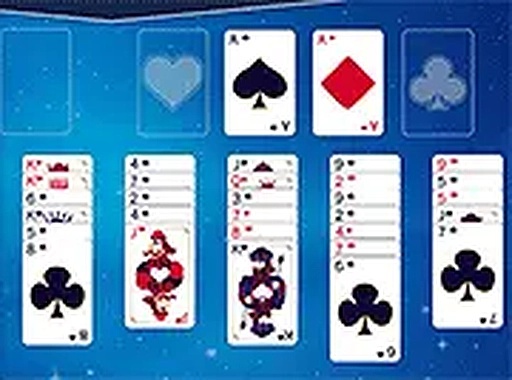
Galaxy FreeCell Card Puzzle brings the classic FreeCell solitaire experience to your browser with a space-themed visual style. The core objective is to move all cards from the tableau to the four home cells, sorted by suit in ascending order from Ace to King. This game requires careful planning and strategic thinking, making it suitable for players of all ages. It offers a relaxing yet engaging puzzle experience. You can play on any device, including mobile phones and desktop computers, without installing any software. The full-screen mode enhances the immersive space backdrop filled with stars and galaxies.
How to Play
To play, start by examining the eight columns of cards on the tableau. You can move cards between columns if they form a descending sequence and alternate colors. The four free cells at the top left can each hold one card temporarily, giving you more options. Use the undo button to reverse a move or the hint feature if you need guidance. The game ends when all cards are in the home cells. Play in full-screen for a better view. The game works smoothly on mobile and desktop browsers with no downloads required.
Game Features
Galaxy FreeCell Card Puzzle is free to play with no downloads. It features a space theme with starry backgrounds. Full-screen mode provides an immersive view. The mobile-friendly design works on phones and tablets. Undo and hint features help you learn. It is suitable for all ages and family-friendly.
Tips for Success
Galaxy FreeCell offers a calm and thoughtful card puzzle that respects your time. The space theme adds visual interest without distraction. It is a reliable choice for a quick mental break or a longer play session.
✅ Compatibility & Testing
• Desktop (Windows 11, macOS Ventura)
• Mobile (iPhone 14, Samsung Galaxy S23)
• Tablet (iPad Pro, Android tablet)
✅Supported browsers: Chrome, Safari, Edge, Firefox (latest versions)
❌ Not supported: Internet Explorer, older browser versions
Faq
Can I play Galaxy FreeCell Card Puzzle on my tablet?
Yes, the game is designed to be mobile-friendly and works on tablets and phones. You can play directly in your browser without downloading any app.
Is Galaxy FreeCell Card Puzzle free to play?
Yes, the game is completely free to play. There are no hidden fees or subscriptions required. You can enjoy the full experience without any cost.
Does Galaxy FreeCell Card Puzzle have a timer?
No, the game does not include a timer. You can take as much time as you need to plan your moves and solve the puzzle at your own pace.
Can I undo a move in Galaxy FreeCell Card Puzzle?
Yes, the game includes an undo button that allows you to reverse your last move. This feature helps you learn from mistakes and try different strategies.
Does Galaxy FreeCell Card Puzzle work on desktop computers?
Yes, the game works on desktop computers as well as mobile devices. It is optimized for both platforms and supports full-screen mode for a better view.
Are there different difficulty levels in Galaxy FreeCell Card Puzzle?
The game offers a standard FreeCell experience. While there are no explicit difficulty levels, the puzzle itself provides a consistent challenge that requires strategic thinking.






Comments
0 comments