
Reviews
Tile Slide Puzzle delivers a classic slide puzzle experience with a clean interface and responsive controls. The two grid sizes offer variety for both quick sessions and deeper challenges. The move counter encourages improvement, and the offline play is a nice bonus. It is a solid choice for puzzle fans of all ages.
About this game
Game Introduction
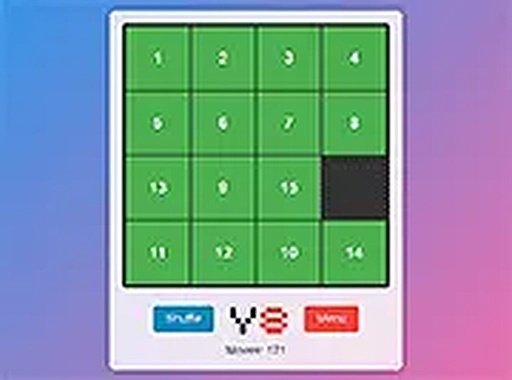
Tile Slide Puzzle is a classic slide puzzle game that invites players to rearrange tiles and restore a complete image. The game offers two grid sizes: a 4x4 grid for a shorter session and a 6x6 grid for a deeper challenge. Each move slides a tile into the empty space, and the goal is to finish with as few moves as possible. The theme is inspired by classic puzzle mechanics, without any violent or scary content. It is designed for players who enjoy logic and pattern recognition. The game runs directly in the browser, so no download or installation is needed. It works on both desktop and mobile devices, making it easy to play anytime. The interface is clean and the controls are responsive, providing a smooth experience for all ages.
How to Play
To play Tile Slide Puzzle, start by selecting your preferred grid size. On the main menu, click 4x4 for a quick puzzle or 6x6 for more complexity. The game board shows a scrambled image with one empty tile. Tap or click any tile that is next to the empty space to slide it into that spot. Continue moving tiles until the full picture is revealed. The move counter tracks your progress, so you can try to improve your score. The game is simple to learn and does not require any special skills. It is suitable for children and adults alike. You can play on a computer, tablet, or smartphone without any extra software.
Game Features
The game features include: two grid options for different difficulty levels. Smooth and responsive controls on touch and mouse devices. Full screen mode for an immersive experience. Free to play with no hidden costs. No ads that interrupt gameplay. Works offline after initial load. Lightweight design that loads quickly even on slow connections.
Tips for Success
To solve the puzzle efficiently, start by focusing on the top row and leftmost column, moving tiles into place one by one. Try to plan several moves ahead to avoid getting stuck. Use the empty space as a tool to rotate tiles around the board. Practice on the 4x4 grid first to build your skills before tackling the 6x6 challenge. Keep an eye on your move count and aim to reduce it with each attempt. Staying patient and methodical will help you complete the puzzle faster.
Compatibility
• OS: Windows 10+, macOS 11+, iOS 14+, Android 10+
• Browsers: Chrome 100+, Safari 15+, Edge 100+, Firefox 100+
• Not compatible with Internet Explorer
Tested on real devices ✅ works as expected
Faq
Is Tile Slide Puzzle free to play?
Yes, Tile Slide Puzzle is completely free to play. There are no hidden costs, subscriptions, or in-app purchases required. You can enjoy the full game without any payment.
Can I play Tile Slide Puzzle on my mobile phone?
Yes, Tile Slide Puzzle works on both desktop and mobile devices. The controls are optimized for touch screens, so you can play on a smartphone or tablet without any issues.
Does Tile Slide Puzzle require an internet connection?
After the initial page load, Tile Slide Puzzle can be played offline. This means you can enjoy the game even without an active internet connection, making it convenient for travel.
How do I reset the puzzle in Tile Slide Puzzle?
To reset the puzzle, simply refresh the browser page or look for a reset button on the game interface. This will scramble the tiles again and restart your move counter.
Are there different images to solve in Tile Slide Puzzle?
The game may include a single image or multiple images to solve. The specific number of images is not specified, but the core gameplay involves rearranging tiles to restore a complete picture.
Can I track my best scores in Tile Slide Puzzle?
The game includes a move counter that tracks your progress for each session. It is not specified whether scores are saved between sessions, but you can note your best move count manually.










Comments
0 comments